Do you want to send your foreign worker back home legally? then don't forget to apply for Check Out Memo (COM) at ePLKS Portal, If your worker’s employment is ending (end of contract or termination), you will be required to submit a COM at Immigration to remove her employment records from you. Failure to apply for a COM will also result in a fine, especially when you want to hire another foreign worker & your previously hired worker may be blacklisted to enter Malaysia for not less than 5 years. 
The employer should ensure that the foreign employees return to their country of origin via the requested exit point on the date stipulated in the COM. If the employer fails to apply for the COM, the foreign workers are still considered to be under his employment and the employer is still responsible for the foreign workers.

Before the lunch of the ePLKS Portal, employers have to visit the nearest Jabatan Immigration (JIM) to apply for COM but after the lunch of the ePLKS Portal, you can apply right from your office table. 

  1.  Goto https://imigresen-online.imi.gov.my/plks/main
  2. Log in using your User ID & Password
  3. Goto eCOM (located at the top menu bar)
  4. Input the worker's passport number, select the nationality from the dropdown menu Finally, Click Search (Cari) 

  5. Now Click Update (Kemaskini) and the system will fetch the data 

    1. Date of Birth
    2. Document or Passport number
    3. Nationality
    4. Gender (Male or Female)
    5. Document or Passport Issuing Country
    6. Permit Expiry Date
    7. Special Pass No. (If Applicable)
    8. Country of Birth
    9. Type of Document 
    10. Document or Passport Expiry Date

    If all the information is up to date go ahead and fill up the required inputs in the next section (Information for Check Out Memo (eCOM)).

    4. Date of Exit or Date of departure from Malaysia as per ticket
    5. Select the name of the airport or checkpoint of exit (in our case it's KL International Airport (KLIA)). 
    6. Type of transport (in our case it's By Air).
    7. Destination Country
    8. Reason for Exit
    9. lastly Name of the Airline/Trasport Agent (in our case It's Malindo Air)

  6. If you need more time to fill up the form just click Update (Kemaskini) and save the eCOM application at any point.

  7. Now prepare the Passport & Ticket Booking (Flight/Feri/bus or train).


  8. Select the document name from the dropdown, click Choose File and click upload (Muat Naik), remember you can only upload 1 file at a time.

  9. List of original documents that need to be uploaded for the reference of the Malaysian Immigration Department:

    1) Copy of Passport

    2) Copy of Transportation Ticket. example: Plane/Ferry/Bus Ticket

    Uploaded documents must be less than 250 kb in size.

    *Only files with PDF, JPEG & PNG file types are allowed to be uploaded.

  10. If all the documents are uploaded successfully the list of the documents will be shown just below the upload sections.

  11. Now click on all the checkboxes to accept the terms and conditions for the application and click submit (Hantar).

  12. Popup window will ask to reconfirm the submission, if all the information is perfect click submit button.
  13.  
  14. The last step is to wait for Immigration to approve the application.

That's all for now, It will most likely say that the application has been submitted for approval, You can find all your submitted applications by going to Status Application (Status Permohonan) in your ePLKS Portal. 
After getting approval print out 3 copies of the eCOM approval letter, 2 copies will be attached to the worker's passport & 1 copy for the employer's record for future reference. 

I hope the guide helps the user of the ePLKS Portal, don't share your suggestions & comments. Do let us know if something is missing, we will update the guide if needed. Until next time Peace & Blessing to all.


All logos & web links are property of Immigration of Malaysia & shared for lawful purposes, any misuse may lead to legal actions.

on

Got your ePLKS portal ID? if yes then you are in place to learn how you can apply eSpecial Pass (eSP) online without visiting the Immigration branch office.  Is that sound good to you? if yes then go ahead and follow the steps.


You can apply 5 different types of eSPs at the ePLKS portal such as: 

  1. Pending Temporary Employment Pass Renewal;
  2. Making Arrangements to leave the country;
  3. Pending Passport Renewal;
  4. & pending medical reports.

These are the common reasons you can apply eSP for, You may need to apply to Check Out Memo (eCOM) if you're going to apply for eSP for the Purpose of "Making Arrangement to Leave the Country".


Today I'm going to share the practical process with our readers that how you can apply for eSP without visiting Immigration Office. So let's get started.


If you haven't registered for ePLKS Portal ID you can follow our guide for ePLKS Portal ID Registration.

Got your ePLKS Portal ID? Continue to apply eSP by following the below steps:


How to Apply eSP Using IMMI ePLKS Portal

  1. Goto ePLKS Portal https://imigresen-online.imi.gov.my/plks/main?logMasuk;
  2. Login using your ID and password;
  3. Goto "PERMOHONAN LANJUTAN PLKS (INDIVIDU)" see the screenshot below;
  4. Click on image to enlarge

  5. Input the required field and click the search button (Cari);
  6. Click on image to enlarge

  7. Next, the fetched data will be shown in the table just below the search table;
  8. Click on image to enlarge

    Note that the eSP application is only applicable if your employee's temporary employment permit is expired otherwise, you need to submit the temporary employment permit renewal and you will see the update (Kemaskini) button appear instead of eSP

  9. Now Click on the eSP button, on the next page we need to select the reason for eSP and upload the necessary documents;
  10. Click on image to enlarge
    1. In case an employee preparing to leave the country (don't forget to apply to eCOM for this reason);
    2. 2nd reason is for the Fomema Examinate report pending or you have appealed against the unsuitable result;
    3. Pending Passport renewal of employee (prepare the letter/acknowledgement receipt from the Embassy or High commission
    4. Pending Kementerian Dalam Negeri's (KDN) approval, this category is not meant for Temporary Employment holders, only choose this reason if applicable. you must prepare the letter of Pending KDN approval;
    5. Select if the temporary employment permit is pending for renewal & you wish to renew after eSp approval.
  11. Now we will upload the mandatory documents and submit the application for approval, take a look at the screenshot below:
  12. In our case, we have a reason for eSP "Making Arrangement to Leave the Country", so we have to prepare the flight ticket and bio-data page of the employee's passport;
  13. Upload the necessary documents and acknowledge all the regulations and agreement by clicking all 3 checkboxes and finally click submit (Hantar). 
If you wish to book a flight ticket don't forget to visit our flights portal, or live chat with us for assistance.

Approval takes approximately 5 working days but may take longer, depending on the traffic flow and Immigration Branch where your file is being handled, for example, if your company address is Johor Bharu then the application will be referred to Immigration Johor Bharu for eSP to be issued.

Next, we will make the payment if got approval, I will try to share a separate post for the eSP payment guide. Thanks for reading, don't forget to share your suggestions or let us know if something is missing, we're more than happy to welcome your comment as well. Peace & Blessings! :)

All logos & web links are property of Immigration of Malaysia & shared for lawful purposes, any misuse may lead to legal actions.
on

Malaysia Immigration Department started to Digitalize its services with the Vision of Digital Malaysia,  MyEG was authorized to renew worker permits in 2013 by Immigration Malaysia, and MyEG was also appointed to register undocumented migrants in September 2014 although actual registration started a year later in September 2015. 


During the April 2015 parliament sitting, former deputy home minister Wan Junaidi Tuanku Jaafar pledged that the government will set up its own online system to manage foreign workers' & Maid permits, instead of relying on MyEG.


When Dr Mahatir came to power again he criticized the way the previous Govt. handle Immigration Services and initiated reforms to provide direct services to Employers through the official website as well as over the counter. In the first phase, Immigration allows to renew the work permits through counter and later launch the official Immigration Online portal and started to provide work permits renewal, checkout memos, and special passes online under the ePLKS system. 


In this post, we will share the step-by-step guide to registering for the ePLKS portal, registration is free of cost but if you hired someone to do the job for you, then there may be service charges.


How to Registered e-PLKS ID

  1. Go to the ePLKS portal https://imigresen-online.imi.gov.my/plks/main;
  2. Click Registration (pendaftaran);
  3. From the dropdown menu shown in the image above, choose the right category, if you going to renew the work permit of your construction, plantation, services, & agriculture Click "Permohonan Baru Pelabagai Sektor" and for maid "Permohonan Baru Pembantu Rumah", in our case it's Multiple Sectors (Pelabagai Sektor).
  4. Enter ROC, IC/Mykad of  Employer/Employer's Representative, and click Search (Cari);

  5. 1. If the employer is blacklisted by Immigration, the system will popup the following error at the top of the page.


    2. If the employer's address is incomplete, the employer's representative is not on the list of representatives or the employer email does not exist, the ePLKS ID application cannot be submitted, in that case, contact the OSC centre.


    3. If the application cannot be forwarded due to the employer's information being incomplete with OSC then click print slip (Cetak slip) to visit the OSC counter to update your record within the Immigration system.

  6. Otherwise, the system will fetch the list of Director/Representative of Employer registered with Immigration OSC centre;
  7. Here you can edit the email and phone number of listed directors/representatives by click on the name (as shown in the image above);
  8. Click the check box (under the "Philih" column) to Apply e-PLKS ID.
  9. Now click on continue ( Seturusnya) to upload the required documents;
  10. Select the document name one by one from the drop-down list> click choose file > select file from your pc/ device and click upload (muat naik). repeat the same steps for all files/documents;
  11. Download the Registration Letter's soft copy (Surat Kebenaran Pendaftaran ID ePLKS@JIM)

    To compress your documents to 250kb use photoshop, an online PDF compressor or share your files with us to help you compress, you can send us an email at support@spicyblogging.com.


    If you are appointing your representative then your director will sign the letter and EPF account statement of the last 3 months (BORANG ''A'' is not Acceptable for registration).


    If you have more than one representative don't forget to mention it in the letter and upload identity documents for all of them.

  12. In the case of Director will deal with Immigration then you have to upload the following documents (shown in the image below);
  13. In the case of a representative who is not listed in form 49/Section 58 then you must upload the KWSP (EPF) account statement of the last 3 months;
  14. If everything is fine then the "Submit" button (Hanter) will appear at the right corner of the window and you are good to submit the application, a pop-up window will appear on the popup screen to accept legal agreement (click the check box on the left side of the popup screen) and again click submit (Hanter).
You can track the status of the ID Registration Application.

Note: you will receive an acknowledgement email at the time of submission and after ID approval they username & password in two separate emails, if in case you have not received the response call them directly +603 8880 1452 (call centre Unit Lanjutan Bahagian Pekerja Asing) or chat with the support team by joining the Telegram Group.

Conclusion:
I hope the guide will help the employer toward smooth ePLKS ID registration and the work permit renewal process becomes easier for all of you. don't hesitate to ask if you have any questions, you can use our live chat widget from Monday to Friday 9:00am to 6:00pm or leave a comment below. 

All logos & web links are property of Immigration of Malaysia & shared for lawful purposes, any misuse may lead to legal actions.
on

Malaysia opened its Border for Vaccinated Travellers from Pakistan, India, Nepal, Bangladesh, Srilanka and Indonesia. but yet you have to spend 7 days in-home quarantine upon arrival and RT-PCR Test Covid-19 Negative Report is also required. Below we are going to take a look at the steps required before starting your journey.


The following categories are permitted entry into Malaysia without having approval from MyTravelPass Approval.


List of long-term Visit/Employment passes that have EXEMPTION from MTP approval: 

  1. Diplomat (Exemption Order)/Dependent/Foreign Maid.
  2. Expatriate Pass (Category I, II, III) / Dependent/Foreign Maid.
  3. Resident Pass-Talent (RP-T) /Dependent/Foreign Maid.
  4. Professional Visit Pass – Specialist.
  5. Professional Visit Pass.
  6. Permanent Resident (PR)/Spouse of PR/ Child of PR.
  7. Long Term Pass (Husband/Wife/Child) to Citizens.
  8. Senior Citizen Long Term Pass (Elderly)
  9. Widow/Divorcee Pass to Citizens
  10. Student Pass /Dependent/Companion
  11. Malaysia My Second Home Pass (MM2H)/Dependents/Foreign Maid.
  12. Resident Pass.
  13. Temporary Working Visit Pass (PLKS)
  14. Foreign Maid (PRA)

The holder of long term passes (PLKS, Spouse, Students Pass and MM2H Pass Holders) whose passes are expired or who do not fall under above mention categories are required to apply for entry application via the appropriate channel i.e MTP/Myentry or Travel Authorization. Pre-entry approval is also required for newly approved employment, professional resident and short term business passes. To apply for entry approval check out our Re-entry PLKS guide. 


We also recommend checking Embassy/ High Commission website for the latest update.


Got MyTravelPass Approval? if yes please proceed to the next step.


Apply For Social Visit Pass at the Nearest Malaysian High Commission or Embassy

If your Visit/Spouse/Employment Pass expired you have to submit your passport along with the MyTravelPass approval letter, required document and visa fee (In my case it's a 12,500 /PKR service fee of 2000 charged by the authorised agent). The High Commission/Embassy will stamp temporary 30 days social visit pass on your passport and you're good to go to plan your Journey.


In our case here is Social Pass (VDR) issued based on MyTravelPass.

Click on image to enlarge

Check out our cheap flight search engine to book your air ticket.


Update: 14-12-2021

If Embassy/High Commission called for an interview don't forget to take a Company Letter/Referral letter of the employer with you, they may ask for additional documents such as SSM, Employer National Identity Card etc.


Update: 26-03-2022

New SOPs for before departure & upon arrival added.


*In our case they asked for Company/Employer Letter to confirm that I'm Employed with the same Employer.

Apply for home quarantine if you are fully vaccinated

Fully vaccinated travellers now have the option to quarantine from the comfort of their homes when they arrive in Malaysia but keep in mind if your country is still under the restricted list then you may not be able to avail this option. In my case, Pakistani Nationals having long term passes are allowed to apply for home quarantine.


Prepare the following documents & take note of the below instructions, also don't forget to visit the Ministry of Health Portal for the latest update:

Required Documents for Home Quarantine;

  • Passport;
  • Vaccination certificate (must be in English/Malay);
  • MyTravelPass/myentry/travel authorization Approval (if applicable);
  • Air Ticket;
  • Accepted file formats:PNG,JPEG,PDF;
  • Max file size 250 KB (your image to 2500 KB);
  • Travellers from yellow fever endemic counties must be provided yellow fever vaccination certificates issued by Health Department or Government's approved entity;
  • Submit home quarantine application prior to 4-10 days of departure.

Before Departure


Starting from 1 May Fully vaccinated travellers and children aged 12 and below are exempted from pre-departure and on arrival tests.


Partially or not vaccinated travellers must take an RT-PCR test 2 days before departure and a supervised RTK-Ag test within 24 hours of arrival. They will also have to quarantine for 5 days.


Covid-19 Insurance is no longer required for all travellers entering Malaysia.


How to Apply for Home Quarantine (You can skip this step if not applicable or you are exempt from quarantine)
  1. Go to hso.moh.gov.my/outbreak-portal-hve/traveller/hvareg;
  2. Fill up all required inputs with personal detail, flight, upload mandatory documents (I will recommend uploading all related documents even if it's optional, it will help you to increase the approval chances.);
  3. Fill up the home quarantine address where you will stay during the quarantine period (if the hospital, enter the address accordingly;
  4. It is important to declare the number of people resident in the house - and available rooms and toilets for quarantine;
  5. Fill in the verification words (Captcha) accept the declaration and click submit;
  6. You will receive the acknowledgement email and it will take 2-3 working days to get a response from the home quarantine application review team (it may take in some cases).

Install the Mysejahtera application to check-in at the airport otherwise, you may face may not be able to check-in & make sure that the application is up-to-date with the latest version available on the play store, apple store or Huawei Apply Gallery.
  1. Scan the QR code at the check-in counter or Open the app goto Traveller>Travel For> Press the Start button & fill-up the form with your personal detail with Quarantine Address (same as per home quartine approval letter.);
  2. Digital Traveller's Card will be issued to Fully Vaccinated;
  3. Digital Home Surveillance Order (HSO) will be issued to Partially Vaccinated or to unvaccinated travellers;
You can also register your overseas vaccination certificate in Malaysia. Check out our guide on how to register your vaccination certificate in Malaysia.

Starting from 1st May 2022 RT-PCR test for Covid-19 prior to departure is no longer required for fully vaccinated travellers & children under 12 years & below.


Travellers with previous COVID-19 infection (6-60 days before departure) are required to undergo a professional RTK-Ag test 2 days prior to departure.


Purchase travel and Covid-19 Insurance (for non-Malaysian Citizens).

Upon arrival at Kuala Lumpur International Airport (Malaysia)


Remember don't forget to print out your approval letters i.e MyTravelPass and Home Quartine approval letters.

I hope that the Guide will help you to travel safely and you reach your destination in good Health, also don't forget to ask if anything is missing or you can also share your suggestions to improve if something is missing. Share a comment below or say hello Via 24/7 live chat, we're more than happy to assist you. Peace and Blessing.

on

Fomema2u Malaysia is a one-stop centre for the medical needs of employers who wish to hire foreign workers to boost their workforce, it was very difficult to register for medical examination before the Employer Portal, I remember when I first time came to Malaysia in 2013 and ask my colleague, to find an agent to register at Fomema & pay the fee by visiting any bank If you have a bank account or the agent to help pay the registration fee.


Most of the time a layman who does not have knowledge about permit renewal can be trapped by the clever agents to get some extra money. But things have been changed since the institutions started to prefer online services instead of offline offices, to follow the goal of Digital Malaysia Fomema Malaysia SDN BHD started to provide online registration of yearly medical examinations of the foreign workers. To use the portal, you will need to submit a registration form to register yourself as an employer or Individual. Registration must be approved by FOMEMA SDN BHD before you can start to register your worker.

In this tutorial, I would like to share the step-by-step guide on how to register on Fomema Employer Portal to get instant Registration for medical examinations. 

You must prepare the following documents according to your location.


Peninsular Malaysia

“If you are registering as an individual employer, then you need to upload a copy of your NRIC if you are Malaysian or a copy of your passport identification page if you are a non-Malaysian. You will also need to upload a copy of your worker's calling visa or work permit. If you are registering as a company, you will need to upload a copy of your company's registration documents (Form 9), a copy of the NRIC/Passport of the contact person, a copy of the letter authorizing the contact person to perform worker registrations and any of worker's calling visa.”


Labuan

“If you are registering as an individual employer, then you need to upload a copy of your NRIC if you are Malaysian or a copy of your passport identification page if you are a non-Malaysian. You will also need to upload a copy of the passport front page/ visit pass for a worker. If you are registering as a company, you will need to upload a copy of your company's registration documents (Form 9), a copy of the NRIC/Passport of the contact person, a copy of the letter authorizing the contact person to perform worker registrations and a copy of the passport front page/ visit pass for a worker.”


Note: Upload each document separately. Valid file formats are JPG, PNG & PDF, the total sizes of all files are limited to 10 MB.


let's get started with the registration process:

  1. Go to https://portal.fomema.my/employers/sign-up 
    Click on Image to Enlarge

  2. Enter your email address, fill the captcha (click on check box) & click register.
  3. Click on Image to Enlarge

  4. Open your email Inbox & follow the instruction you have received from Fomema's automated email.
  5. Click on image to enlarge

  6. Click on the link & complete the registration with supporting documents (as shown below, replace the filled inputs with yours). 
  7. Fomema Registration Form
    Click on image to enlarge

  8. Now upload the supporting documents one by one by selecting from the dropdown menu and click browse to select a file (png, jpg or pdf format) from computer/device & click on Submit  Button for Approval. Alhamdulillah, you did it.

You can get the soft copy of Letter authorization by download button below. (report broken link to support@spicyblogging.com)

Fomema offers online live chat support to answer your questions or if you are facing any difficulty to get approval or somthing is troubling. (see image below)

Click on image to enlarge

You can also ask me without any hesitation furthermore if you need authorization letter format just drop me an email here (support@spicyblogging.com) I will try to reply as soon as possible with Authorization Letter file to help you. 

Image Credit: Fomema2u.com.my
on

Coronavirus disease (COVID-19) is an infectious disease (namesake) caused by a newly discovered coronavirus. Most people who fall sick with COVID-19 will experience mild to moderate symptoms and recover without special treatment. Malaysia has recently recorded a very high number of positive cases of COVID-19.


The Ministry of Health Malaysia (MOH) in collaboration with MyEg Medical Services SDN BHD has started on-site screening services to prevent the spread of COVID-19. They Offered PCR screening test for Covid-19 at only RM150/ per pax. This can help companies and individuals for cost-saving & better approach to prevent the spread COVID-19.


Here some Term & Conditions to have MyEg Medical Services at your doorstep:

  1. Full payment (if any) must be made prior to proceeding on scheduling preparation arrangements.
  2. Eligible individual details undergoing the screen test must be provided before schedule preparation and any changes must be informed to MYEG 1 working day before 12 noon.
  3. T+3 working days lead time is required for a walk-in screen test at MYEG medical partner clinic/centres for screen test appointment preparations.
  4. T+5 working days lead time is required for an on-site screen test for screen test appointment preparations.
  5. Reschedule and cancellation is not allowed 7 days before the confirmed appointment or a penalty of RM50 per patient will be incurred.
  6. Patient must follow strictly on appointment date and time; a maximum allowance of 30 minutes will be given for patients to show up for the scheduled appointment and at the discretion of MYEG/MYEG Medical partner.
  7. MYEG will not be held accountable for the information provided that is generated through a different entity.
  8. For no show patients on screening day, an RM50 penalty fee will be imposed per patient for PSP PERKESO claim patients and Self-Pay screening customers appointment will be forfeited.
  9. Individual/employer will bear the screening cost if the employer is found to be in-eligible for PSP PERKESO claim.

Note that you must acknowledge all the above terms and consent form for releasing test result via email by signing the letter which you may receive via email or from a representative of MyEg Medical Services SDN BHD.


And you have to fill up the following detail and send it to MyEg Medical Services to get an appointment: 

  • COMPANY NAME
  • ROC
  • PERSON INCHARGE NAME (PIC) NAME
  • CONTACT NUMBER
  • COMPANY ADDRESS
  • PROPOSE SCREENING DATE
  • PROPOSE SCREENING TIME
  • SCREENING LOCATION
  • TOTAL SCREENING WORKERS
  • FLIGHT TICKET DATE & TIME  

Here is the contact detail of MyEg Medical Services SDN. BHD. Ask them directly if you have any questions or to know the nearby locations:


SELANGOR:

MYEG MEDICAL SERVICES SDN. BHD.

Level 43A, MyEG Tower,

No.8 Jalan Damansara, Empire City, PJU8

47820 Petaling Jaya, Selangor Malaysia

Tel: 03 – 7664 8000

Fax: 03 – 7664 8008


JOHOR BHARU:

MYEG MEDICAL SERVICES SDN. BHD.

N0 108, JALAN SETIA TROPIKA,

1/7 TAMAN SETIA TROPIKA, 81200 JOHOR.

H/P: 014-9647821 (Joanne Wong)

Email: joanne.myeg@gmail.com 


Let us know how you experience COVID-19 screening at your doorstep also do not forget to share your views in the comment below. I have two more blog post in the pipeline on how to apply for entry into Malaysia and what steps are required after getting entry approval from DG Immigration to enter Malaysia.


Image Credit: Getty Images/SrdjanPav

on


In July 2019 Malaysian Immigration has cancelled work permits from defaulter companies or you may say companies established by moneymakers from foreigners by selling them work permits at high cost rather than employee them in their own projects. As a result of the action against these companies, approximately more than 30,000 work permits have been cancelled/Batal. That is the reason I got too many requests from Pakistani Nationals living in Malaysia to check the status of their work permit. 

The online tool which allows the public to check the work permit status individually by passport number is no longer live, Blocked by the Immigration Department of Malaysia but if you have a company ROC number (Company Registration Number) then you have the option to check the status of that particular company. By ROC number you can get the status of all work permits issued under that company but what about an individual? this is the question that forces a layman to ask in Whatsapp groups or call someone to help them to check the status. 


But today your search & call for help is over because I found the way to check your own work permit by just entering your passport Number & Nationality.

Check out our previous post to Get Visa Status Using ROC (Company Registration Number).
Follow the steps to check the status:

  1. Download the HTML file SEMAKAN STATUS PERMOHONAN LANJUTAN NOT IN VISA
  2. Open the HTML file using Chrome or Firefox.
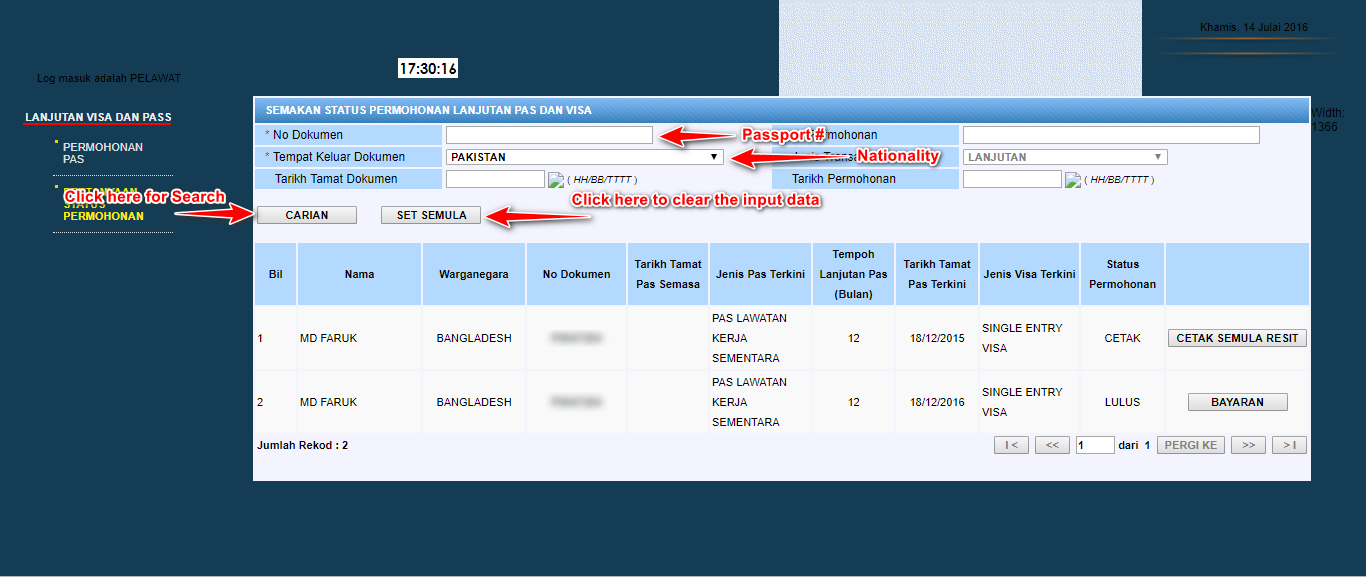
  3. You will see the following screen.


  4. In the screenshot above, you can see the highlighted area of Passport # & Nationality.
  5. Enter your Passport #, select your Nationality from the dropdown list & Press the Carian (Search Button) as shown in the image above.
  6. If the status shows CETAK (PRINT) that mean your permit is valid (if expiry is due), as shown in the image below.


But if the status shows BATAL (CANCEL) that mean your permit has been cancelled & you're not able to travel/exit anymore from or to Malaysia with your current visa status,
as shown in the image below:


I hope it will help you to understand your work permit status, & don't forget to know the meaning of other short statuses shown in the table.
Here is some of the shortcode that Malaysian Immigration use to show your work permit application status:
 

Watch the video tutorial if you can understand Urdu/Hindi.

Check out our previous post to Get Visa Status Using ROC (Company Registration Number).
The purpose of the tutorial is to just give awareness to foreigners living in Malaysia and it will help you to stay safe from lies of your legal or non-legal agent & we hope that you will also share this post to spread the knowledge with people who need it & special thanks for reading the post.
Note with caution that all the web pages images and logos used in this tutorial are property of the respective owner any illegal use of the service may cause legal action.  Peace & Blessing Bodies…!! :)
on

For the last 4 years, I’m living in Malaysia, I have something about the immigration visa permit procedure and normally it’s very difficult to know without hiring an agent/consultant. In this tutorial, I gonna share some useful stuff that will help the foreigners living in Malaysia.
The common question everyone will ask is how to check Permit Status Online. In the past Malaysian immigration do provide a service to check the Permit Status using the Passport number of foreigner workers but in 2014 while they were updating the system they stop the service to check permit status through Passport numbers.

Nowadays if someone wishes to check the status of their work permit they must have “Application Number (Nombor Permohonan), Employer Identification Number (No. Kad Pengenalan Majikan) and last but not least Company Registration Number (No. Pendaftaran Syarikat)” Formally known as ROC Number in Peninsular Malaysia. I will also share the way how to find out the ROC to check your permit/employment pass status.
To do so, we must have the Company Name which you can find on your sticker (PLKS) you have placed on your Passport or if you don’t have the passport you may have I-Kad, you can grab it from your I-Kad or in most cases from your permit copy provided by employer or sub-agent.
So now if you got the name of your company, let’s start to check the status. Keep note that in this tutorial we will only learn how to check the status of a general work permit, which is issued under these 5 approved sectors.
Construction, Manufacturing, Plantation, Agriculture and Service Sector

Check out the video guide as well


About MyData-SSM:

MYDATA was founded in 2016 to provide users with a single, direct electronic access point to the official company registration offices in Malaysia. We have been appointed by the Companies Commission of Malaysia (CCM) - Suruhanjaya Syarikat Malaysia (SSM) as its Technology and Service Provider for the SSM MYDATA Services. MYDATA is a legitimate and legal source of information on companies and businesses incorporated and registered in Malaysia.

Getting Your Company ROC Number By Using Your Company Name

Update: Mydatassm is no longer allowed searching business data by name, you must have ROC # & Mydatassm account to get Company/Business Information.
  • Go to the following website
  • http://www.mydata-ssm.com.my
  • Write your Company's ROC #/Company Name  in the search box and you will get the result something like this:


  • In the row of Number is your company ROC number (There are chances to have the duplicate company registered under the same name but ROC can’t be the same. Make sure by checking the company on your Sticker (PLKS), & also make sure that your company is Enterprise or Private Limited (SDN BHD).

Now we have the ROC Number Let’s Proceed To the Next Step

  1. Go to https://services.spicyblogging.com/check-malaysia-work-permit-status/
  2. The page should look something like this (if it’s not the same let us know we will update the screenshot)
  3. Click on image to enlarge

  4. Now just input your Employer IC or MyKad/ROC (No. Pendaftaran Syarikat or Company Registration Number) or Application # & click on the search button & system will show the table of results just below the inputs.
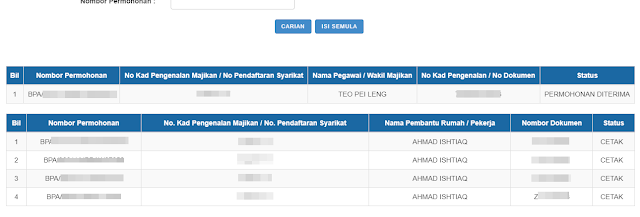
The Result looks something like this:

Note that there may be more than one row/page of results if search by Company Registration/ROC # (If your company hired more than 20 foreign workers) you can use the navigation button at the right bottom corner of the table to navigate your status.

If you would like to get the specific individual status you must have an application # to proceed, let us know n the comment box or you can contact us via the Live Chat widget below if you need help or have any questions. 

Conclusion
The purpose of the tutorial is to just give awareness to foreigners living in Malaysia and it will help them to stay safe from the lies of your legal or non-legal agent.

All the web pages and logos used in this tutorial and property of the respective owner any illegal use of the service may cause legal action.  Peace & Blessing Bodies…!! :)
on